 VStats
Every Vercel site's visitors, in one window.
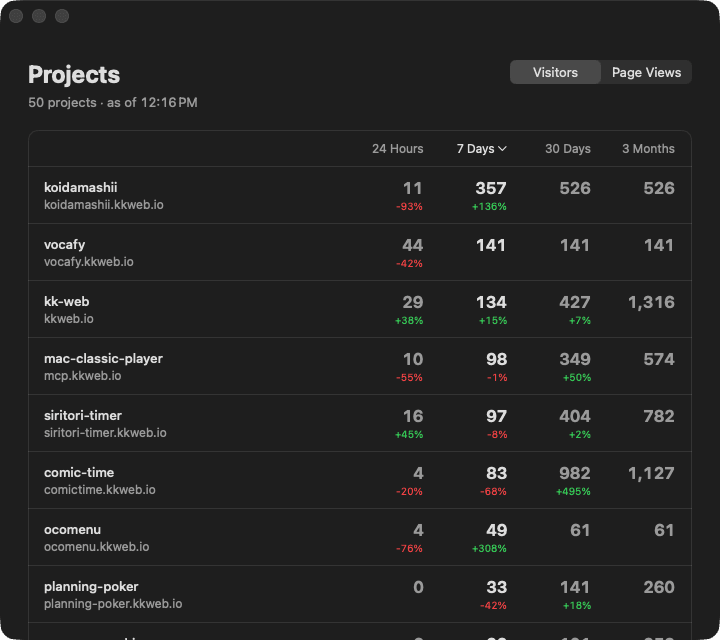
24 hours, 7 days, 30 days and 3 months side by side, with the change from the previous period.
- Web Analytics for every project
- Same numbers as the dashboard
- Your token stays in the Keychain
macOS 14 or later · Apple silicon
Stop opening Analytics one project at a time.
Vercel shows Web Analytics one project at a time.With dozens of sites, you never see the whole picture. VStats puts them in one list.
Features
- Every project at once
- Every project with Web Analytics enabled, across all the teams your token can see. Nothing to pick.
- Four periods side by side
- 24 hours, 7 days, 30 days and 3 months in one row. Click a column header to sort by it.
- Visitors and page views
- Switch between them at the top right. Each number shows the change from the previous period, as the dashboard does.
- Same numbers as the dashboard
- Periods are counted the way the Vercel dashboard counts them. The 3-month column can come out slightly lower, because the API only reaches back 92 days.
- One click to the details
- Click a name to open the site. Click a number to open the dashboard for that project and period.
- Easy on the API
- Each team is counted in a few requests, and the numbers are fetched again only when they are an hour old, or when you press ⌘R.
Get started in three steps.
- 01
Install
Download the DMG and drag VStats into Applications. Homebrew is supported too.
- 02
First launch
VStats is not notarized by Apple, so the first launch is blocked. Click Open Anyway in System Settings → Privacy & Security.
- 03
Paste a token
Create a token in your Vercel account settings and paste it into the window. Scoping it to one team works too.
$ brew install --cask piro0919/tap/vstatsThe token is kept in the macOS Keychain and only sent to api.vercel.com.
Download for free